The Marvel Cinematic Universe (MCU) has produced some of the most iconic and successful films in recent history, and the two-part culmination of the franchise in Avengers: Infinity War and Avengers: Endgame is no exception. Both movies have their merits, and fans have passionately debated which film is superior. In this blog post, we’ll delve into the reasons that make Avengers: Infinity War a more impactful and overall better movie than Avengers: Endgame.
A Bold and Unconventional Storytelling
Infinity War breaks the mold of traditional superhero movies by placing the villain, Thanos, at the center of the narrative. The film follows his quest to collect all six Infinity Stones and wipe out half of all life in the universe, giving him a clear motivation and goal. This unique storytelling decision adds depth to his character, making him a more interesting and complex antagonist than most. In contrast, Endgame focuses primarily on the heroes, adhering to a more conventional narrative that, while still enjoyable, lacks the same level of risk and innovation.
Higher Emotional Stakes
Throughout Infinity War, the Avengers are consistently on the back foot, struggling to prevent Thanos from achieving his goal. The sense of urgency and the emotional toll it takes on the characters is palpable, making the stakes feel genuinely high. This tension reaches its peak in the heart-wrenching climax when Thanos succeeds in his mission, leaving the audience in shock and disbelief. Endgame, however, revolves around the Avengers’ efforts to undo Thanos’ actions, which, while still a compelling story, doesn’t carry the same emotional weight and sense of consequence.
Tighter Pacing and Focus
Infinity War maintains a steady pace and focus, seamlessly intertwining multiple storylines while showcasing each character’s strengths and weaknesses. The film is structured in such a way that it keeps the audience engaged and invested throughout its runtime, despite its large ensemble cast. Endgame, on the other hand, has a slower start and features a more convoluted time-travel narrative that can be difficult to follow. While Endgame’s pacing picks up in its second half, it doesn’t quite match the consistent engagement of Infinity War.
More Balanced Character Development
Infinity War provides a more even distribution of character development and screen time, allowing for a deeper exploration of relationships and personal struggles. The film carefully balances the vast array of characters, making sure each hero has their moment to shine. In Endgame, the focus is primarily on the original six Avengers, with other characters being sidelined or given limited roles. This decision, while understandable from a narrative standpoint, leaves some fan-favorite characters feeling underdeveloped or underutilized.
A Stronger Climax
Infinity War’s climax is an emotional gut-punch that leaves the audience reeling. The shock of Thanos’ victory and the subsequent disintegration of beloved characters create a powerful, lasting impact. Endgame’s climax, while visually stunning and filled with fan-pleasing moments, doesn’t quite deliver the same emotional resonance. The knowledge that many characters are already confirmed for future movies detracts from the sense of finality and consequence, lessening the overall impact of the film’s conclusion.
Conclusion
While both Avengers: Infinity War and Avengers: Endgame are entertaining and well-crafted films, Infinity War edges out its successor in terms of storytelling innovation, emotional stakes, pacing, character development, and the strength of its climax. It’s a film that pushed the boundaries of the superhero genre and left an indelible mark on the hearts and minds of viewers, making it the superior installment in this iconic two-part finale.
This blogpost was created with help from ChatGPT Pro.
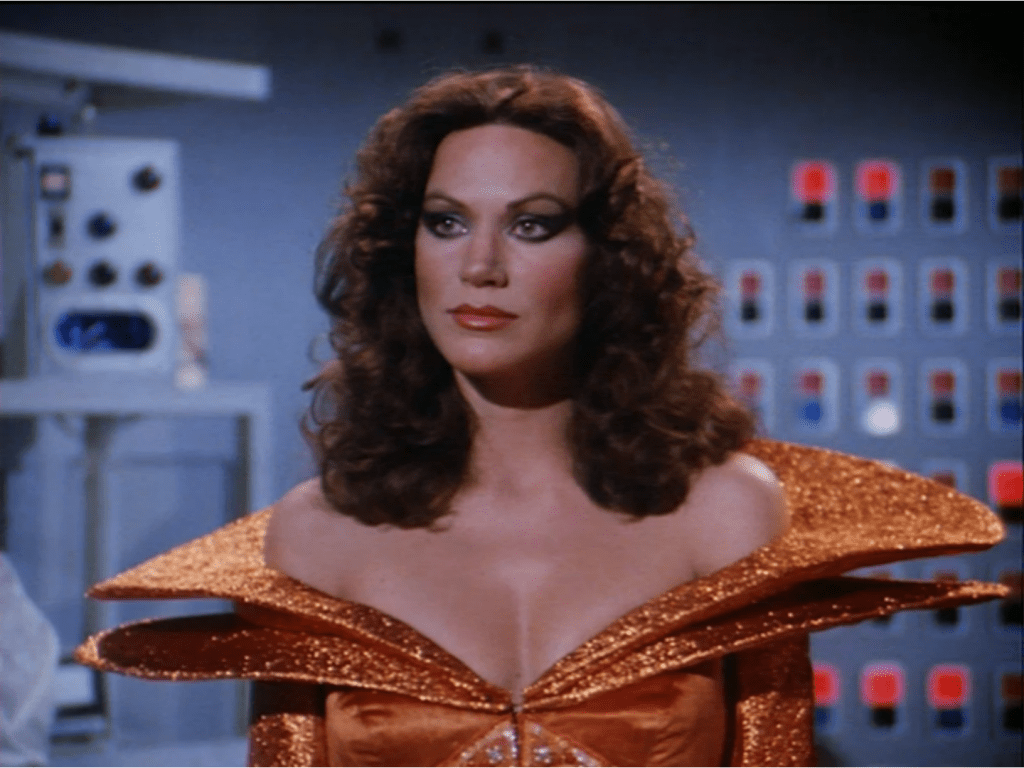
When it comes to iconic villains, Pamela Hensley’s portrayal of Princess Ardala on the 1979-1981 TV series “Buck Rogers in the 25th Century” is often overlooked. However, Princess Ardala is an underrated villain who deserves more recognition for her complexity, cunning, and magnetism. In this blog post, we’ll delve into the character’s most memorable moments and explore why Pamela Hensley’s performance as Princess Ardala deserves a place among the pantheon of unforgettable TV villains.
The Allure of Princess Ardala
One of the essential aspects of Princess Ardala’s character is her undeniable allure. As the seductive and powerful princess from the planet Draconia, Ardala exudes an air of confidence that is both intimidating and mesmerizing. Her elaborate and provocative costumes, combined with her flirtatious demeanor, make her a magnetic presence on-screen. Hensley’s portrayal of the character captures this allure perfectly, making it impossible to look away whenever she graces the screen.
The Complex Nature of Ardala’s Character
While many villains are one-dimensional, Princess Ardala is a multifaceted character with depth and complexity. Her character is driven by a desire for power and a determination to rule the galaxy, but she’s not without vulnerability. As the series progresses, it becomes evident that Ardala is caught between her ambition and her feelings for Buck Rogers.
Pamela Hensley masterfully portrays this inner conflict, allowing the audience to see the humanity beneath the villainous exterior. This depth of character makes Princess Ardala a much more intriguing and relatable villain than many of her counterparts.
Ardala’s Intelligence and Cunning
Princess Ardala’s intelligence and cunning are another aspect of her character that sets her apart as an underrated villain. She is always several steps ahead of her enemies, using her charm and wit to manipulate those around her. Ardala is a brilliant strategist, willing to make ruthless decisions to achieve her goals.
Hensley’s portrayal of the character emphasizes Ardala’s cunning nature, as she expertly navigates the complex world of intergalactic politics and warfare. Her ability to outsmart and outmaneuver her enemies makes her a formidable and compelling antagonist.
Memorable Moments: Ardala’s Confrontations with Buck Rogers
Throughout the series, some of the most memorable moments involve Princess Ardala’s confrontations with the show’s protagonist, Buck Rogers. Their interactions are filled with sexual tension and a battle of wits, as they each try to outsmart the other. These scenes are electric, thanks in large part to the chemistry between Pamela Hensley and Gil Gerard, who played Buck Rogers.
One such scene occurs in the episode “Escape from Wedded Bliss,” where Ardala attempts to force Buck into marrying her as part of a plan to conquer Earth. Their verbal sparring and the high-stakes tension make this episode a standout moment for both characters and showcase Hensley’s ability to command the screen.
Conclusion
Pamela Hensley’s portrayal of Princess Ardala on “Buck Rogers in the 25th Century” is an underrated gem in the world of TV villains. Her magnetic allure, complex character development, intelligence, and memorable confrontations with Buck Rogers make her an unforgettable antagonist. It’s high time we gave Princess Ardala the recognition she deserves as a captivating and multilayered villain who left a lasting impression on the sci-fi television landscape.
This blogpost was created with help from ChatGPT Pro.
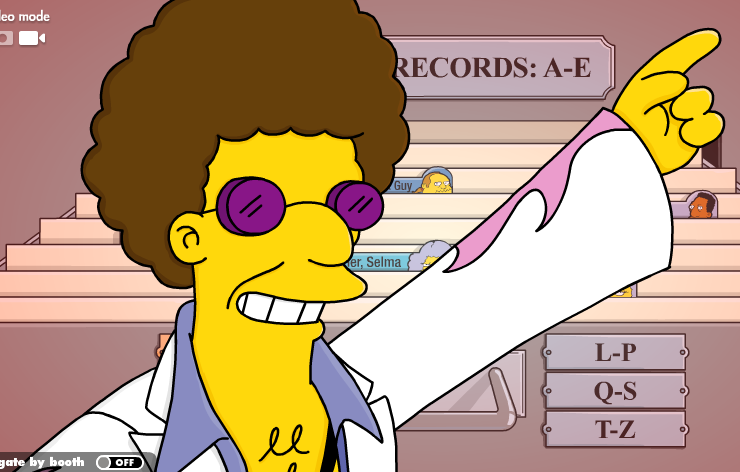
The Simpsons, a long-running, iconic animated sitcom, has given us a plethora of delightful characters since its inception. While we may all know and love the main cast, there’s a whole world of minor characters that have made a lasting impact on the show’s fans. Today, we want to make a case for one of these beloved side characters: Disco Stu. With his groovy dance moves and quirky catchphrases, Disco Stu has won over the hearts of millions, and we’re here to tell you why he truly deserves the title of the best minor character on The Simpsons.
The Nostalgic Appeal
Disco Stu first appeared in the episode “Two Bad Neighbors” in 1997. At the time, disco had long been considered a thing of the past, with most people associating it with the 1970s. But Disco Stu brought it all back, reminding us of a simpler time when people were all about the boogie. In an era where the world was changing rapidly, Disco Stu’s nostalgic appeal offered viewers a sense of comfort and familiarity.
The Unwavering Commitment to Disco
Disco Stu is a character who stays true to his roots. Even as the world around him moves on, he remains unwavering in his commitment to disco. There’s something admirable about his dedication to his passion, no matter how out of step it may seem with the times. Stu’s ability to stay true to himself serves as an inspiration to us all, showing us the importance of embracing our uniqueness and staying true to our passions.
The Iconic Catchphrase
Who could forget Disco Stu’s iconic catchphrase, “Disco Stu doesn’t advertise”? It’s a line that has stuck with fans long after the episode has aired, showcasing Stu’s wit and charm. The catchphrase perfectly captures his personality: cool, confident, and just a little bit quirky.
The Dance Moves
You can’t talk about Disco Stu without mentioning his dance moves. With a style that’s undeniably smooth and groovy, Disco Stu has shown us time and time again that he’s got moves that simply can’t be matched. Watching him dance is a delight, providing viewers with moments of pure joy and entertainment.
The Positive Energy
Disco Stu brings a certain energy to the show that is undeniably infectious. He’s the life of the party, always bringing a smile to people’s faces with his dance moves and witty remarks. In a world that can sometimes feel dark and cynical, Disco Stu offers a refreshing burst of positivity and joy, reminding us of the importance of laughter and light-heartedness.
Conclusion
There’s no denying that The Simpsons has given us a treasure trove of memorable characters, but Disco Stu stands out as the best minor character on the show. With his nostalgic appeal, unwavering commitment to disco, iconic catchphrase, smooth dance moves, and positive energy, Disco Stu has danced his way into our hearts and solidified his place as a fan favorite. So next time you’re watching The Simpsons, take a moment to appreciate the groovy brilliance of Disco Stu, the character who’s always ready to boogie the night away.
This blogpost was created with help from ChatGPT Pro.
In the vast universe of cinematic comedy, there are films that make us chuckle, films that make us laugh, and then there are films that make us howl with laughter, clutching our sides in pure, unadulterated joy. “Hot Rod,” a 2007 comedy directed by Akiva Schaffer and starring Andy Samberg, is one such film. It is a comedy that not only tickles the funny bone but also touches the heart, and it is high time we recognize it as one of the greatest comedies of all time.
“Hot Rod” is a film that thrives on its absurdity, its charm, and its unabashed commitment to its own unique brand of humor. It tells the story of Rod Kimble (Samberg), a self-proclaimed stuntman with a heart of gold, a moped, and a dream. Rod’s mission? To raise money for his stepfather’s heart surgery so he can beat him in a fair fight. If that premise doesn’t scream comedy gold, I don’t know what does.
The genius of “Hot Rod” lies in its ability to take this ridiculous premise and run with it, never once looking back or second-guessing itself. It’s a film that knows exactly what it is and revels in it. It’s a comedy that isn’t afraid to be silly, to be weird, to be over-the-top. And it’s all the better for it.
The performances in “Hot Rod” are nothing short of brilliant. Samberg’s Rod is a lovable underdog, a character whose earnestness and determination are as endearing as his stunts are hilariously disastrous. The supporting cast, including Bill Hader, Danny McBride, and Isla Fisher, are equally fantastic, each bringing their own unique brand of humor to the table and adding to the film’s overall comedic brilliance.
But “Hot Rod” isn’t just a series of gags and stunts. It’s a film with heart. Amidst all the hilarity, there’s a genuine emotional core to the story. Rod’s quest isn’t just about beating his stepfather; it’s about proving himself, about achieving his dreams, about finding his place in the world. It’s a story that, despite its absurdity, resonates on a deeply human level.
The film’s comedic style is also worth noting. “Hot Rod” is a masterclass in comedic timing, physical comedy, and visual gags. It’s a film that understands the power of a well-placed joke, a perfectly timed reaction, a hilariously awkward silence. It’s a film that knows comedy isn’t just about what’s said, but also about what’s shown, what’s implied, what’s left unsaid.
Moreover, “Hot Rod” is a film that isn’t afraid to take risks. It’s a film that dares to be different, that dares to defy convention, that dares to be unabashedly itself. And in a world where so many comedies feel formulaic and predictable, that’s a breath of fresh air.
In conclusion, “Hot Rod” is a comedy masterpiece. It’s a film that delivers laughs, heart, and a healthy dose of absurdity in equal measure. It’s a film that reminds us of the power of comedy, of the joy of laughter, of the beauty of a well-told joke. It’s a film that deserves to be recognized as one of the greatest comedies of all time. So, if you haven’t seen it yet, do yourself a favor and dive into the hilarious, heartwarming world of Rod Kimble. You won’t regret it.
This blogpost was created with help from ChatGPT Pro.
Chris’s note: You’ll need to use one of the HTMLViewer custom visuals that requires an additional cost from what I can discern to have this work successfully.
Introduction
Visual representations are an essential aspect of data analysis, but why not take it a step further and add sound effects to your Power BI reports? Sounds can enhance the user experience and make your reports even more engaging. In this blog post, we will walk you through a step-by-step guide on how to add sound effects to your Power BI reports.
Prerequisites
Before we dive in, make sure you have the following:
A Power BI Pro or Premium account
Power BI Desktop installed on your computer
Audio files in MP3, WAV, or OGG format that you want to use as sound effects
Familiarity with creating basic Power BI reports
Adding Sound Effects to a Power BI Report: Step-by-Step Guide
Step 1: Create a new table for audio files
First, we need to create a new table that will hold the audio file names and their corresponding URLs. In the Power BI Desktop, go to the ‘Home’ tab, click on ‘Enter Data,’ and create a new table with two columns: ‘AudioName’ and ‘AudioURL’. In the ‘AudioName’ column, provide descriptive names for your audio files, and in the ‘AudioURL’ column, insert the web URL where your audio files are hosted. This is necessary because Power BI does not support local audio files.
Step 2: Create a custom column with a JSON definition
We will now create a custom column in the audio table that contains a JSON definition for the audio files. This JSON definition will be used later to trigger the audio playback using a custom visual.
This formula creates a JSON definition for each audio file in your table, which includes the file’s URL and name.
Step 3: Install the HTML Viewer custom visual
To play the audio files, we need to add the HTML Viewer custom visual to our report.
In the Power BI Desktop, go to the ‘Home’ tab and click on ‘Import from AppSource.’
Search for ‘HTML Viewer’ and install the custom visual by clicking on ‘Add.’
Step 4: Add the HTML Viewer custom visual to your report
Now that the HTML Viewer custom visual is installed, we will add it to our report.
In the ‘Visualizations’ pane, click on the ‘HTML Viewer’ icon.
Drag and drop the ‘AudioJSON’ column from your audio table to the ‘HTML Content’ field in the ‘Fields’ pane of the HTML Viewer.
Step 5: Create an audio player using HTML and JavaScript
The HTML Viewer custom visual allows us to display custom HTML content, so we will use it to create an audio player.
Click on the ‘HTML Viewer’ visual that you added to your report.
In the ‘Visualizations’ pane, go to the ‘Format’ tab.
Click on ‘Edit’ next to ‘HTML Content.’
Enter the following HTML and JavaScript code in the ‘HTML Content’ field:
<!DOCTYPE html>
<html>
<head>
<style>
audio {
  display: none;
}
</style>
<script>
function playAudio(url) {
  var audio = new Audio(url);
  audio.play();
}
</script>
</head>
<body>
<audio id="audioPlayer"></audio>
<script>
var audioData = JSON.parse('{{AudioJSON}}');
var audioPlayer = document.getElementById('audioPlayer');
audioPlayer.src = audioData.url;
playAudio(audioData.url);
</script>
</body>
</html>
This code creates a hidden audio player and plays the audio file based on the JSON definition provided in the ‘AudioJSON’ column.
Step 6: Add a slicer to select sound effects
To enable users to choose the sound effect they want to play, add a slicer visual to your report.
In the ‘Visualizations’ pane, click on the ‘Slicer’ icon.
Drag and drop the ‘AudioName’ column from your audio table to the ‘Field’ area in the ‘Fields’ pane of the slicer.
Now, when users click on a sound effect in the slicer, the corresponding audio file will play using the HTML Viewer custom visual.
Conclusion
In this blog post, we showed you how to add sound effects to your Power BI reports using a combination of custom visuals and HTML/JavaScript. While this method is not supported natively by Power BI, it provides an engaging and interactive way to enhance your reports. With a little creativity, you can take your Power BI reports to the next level and create a truly immersive experience for your users.
This blogpost was created with help from ChatGPT Pro.
Craps is a popular casino game played with a pair of dice. The objective is to predict the outcome of a dice roll, and place bets accordingly. In this tutorial, we will walk you through creating an interactive Craps game within a Power BI report. We will explain the data structure required, how to set up tables and measures, and implement DAX formulas. This guide is designed for beginners and assumes no prior experience with Power BI or Craps.
Prepare the data structure
To create a Craps game in Power BI, we will need three separate tables: Bets, Rolls, and Outcomes. The tables should have the following structure:
a. Bets
BetID (unique identifier)
BetType (Pass Line, Don’t Pass Line, etc.)
Amount (the amount wagered)
b. Rolls
RollID (unique identifier)
Roll1 (value of the first die, between 1 and 6)
Roll2 (value of the second die, between 1 and 6)
c. Outcomes
OutcomeID (unique identifier)
RollTotal (sum of Roll1 and Roll2)
Outcome (Win, Lose, or Continue)
Load data into Power BI
Import the tables into Power BI. For this tutorial, you can use sample data or create your own. Click on ‘Home’ > ‘Get Data’ > ‘Excel’ (or any other source) and load the tables into the data model.
Create relationships between the tables
Once the tables are loaded, go to the ‘Model’ tab, and create relationships between the tables. Connect ‘Bets'[BetID] to ‘Rolls'[BetID], and ‘Rolls'[RollID] to ‘Outcomes'[RollID]. This will allow us to analyze the data and create DAX measures easily.
Set up the report layout
Create a new report page and add the following visuals:
a. Slicer for selecting the BetType. b. Table for displaying the Bets, Rolls, and Outcomes. c. Buttons for rolling the dice and placing bets.
Implement DAX measures
We will need several DAX measures to control the game logic and calculate the outcomes. Some examples include:
a. RollDice = RANDBETWEEN(1,6)
This formula generates a random number between 1 and 6, simulating a dice roll.
b. TotalRoll = [Roll1] + [Roll2]
This measure calculates the sum of the two dice rolls.
c. GameStatus = VAR Result = SWITCH ( TRUE (), [TotalRoll] = 7 || [TotalRoll] = 11, “Win”, [TotalRoll] = 2 || [TotalRoll] = 3 || [TotalRoll] = 12, “Lose”, “Continue” ) RETURN Result
This measure calculates the outcome based on the sum of the dice rolls.
Assign DAX measures to visuals
Once the DAX measures are created, assign them to the appropriate visuals. For example, add the ‘RollDice’ measure to the button for rolling the dice, and the ‘GameStatus’ measure to the Outcomes table.
Set up interactions between visuals
To make the game interactive, set up actions and interactions between the visuals. For example, create a ‘Roll Dice’ button that triggers a new dice roll and updates the ‘Rolls’ table.
Test and refine the game
Now that the game is set up, test it thoroughly to ensure it works as expected. Make any necessary
adjustments to the DAX measures or visuals, and refine the game for optimal performance and user experience.
Customize the report’s appearance
To make your Craps game more visually appealing, customize the report’s appearance using themes, colors, and fonts that suit your preferences. You can also add images or other design elements to enhance the overall look.
Publish and share the report
Once you’re satisfied with your interactive Craps game, publish it to the Power BI service. Share the report with colleagues or friends, so they can enjoy playing the game as well.
Chris’s Note – I pointed out to ChatGPT that it hadn’t incorporated the point system into the Craps game, so the following section is needed to properly have a true Craps game.
Let’s incorporate the point system into the Craps game simulation in Power BI. We will need to modify the data structure and DAX measures to account for the point system rules.
Update the data structure
Modify the ‘Outcomes’ table to include a new column:
Point (the point number that the player must roll again before rolling a 7 to win)
Modify the GameStatus DAX measure
We need to update the GameStatus measure to account for the point system rules. The new measure should look like this:
GameStatus =
VAR Point = IF ( [TotalRoll] >= 4 && [TotalRoll] <= 10 && [TotalRoll] <> 7, [TotalRoll], BLANK() )
VAR Result =
    SWITCH (
        TRUE (),
        ISBLANK ( Point ) && ( [TotalRoll] = 7 || [TotalRoll] = 11 ), "Win",
        ISBLANK ( Point ) && ( [TotalRoll] = 2 || [TotalRoll] = 3 || [TotalRoll] = 12 ), "Lose",
        NOT ( ISBLANK ( Point ) ), "Point"
    )
RETURN
    Result
This measure first calculates the point number (if applicable) and then determines the outcome based on the total roll and point number.
Create a new DAX measure for tracking the point
We need a separate measure to keep track of the point number across multiple rolls.
CurrentPoint =
VAR CurrentOutcome = SELECTEDVALUE ( Outcomes[Outcome] )
VAR CurrentPoint = SELECTEDVALUE ( Outcomes[Point] )
RETURN
    IF ( CurrentOutcome = "Point", CurrentPoint, BLANK() )
Update the GameStatus DAX measure again
We need to modify the GameStatus measure once more to account for the point system rules when the player has an active point number.
Now, the GameStatus measure will calculate the outcome based on the total roll, point number, and whether the player has an active point number.
Update the report layout and visuals
You may need to update your report visuals to display the new information, such as the point number and the updated GameStatus. You can create a card visual to display the CurrentPoint measure and add the updated GameStatus measure to the Outcomes table.
With these updates, the Craps game simulation in Power BI should now correctly implement the point system rules. Players will need to roll their point number again before rolling a 7 to win, as per the standard Craps rules.
Conclusion
In this tutorial, we walked you through creating an interactive Craps game in a Power BI report. We covered the data structure, creating tables and relationships, setting up the report layout, implementing DAX measures, and refining the game. By following these steps, even beginners can create a fun and engaging Craps game in Power BI. Enjoy playing and sharing your game with others!
This blogpost was created with help from ChatGPT Pro.
The Rocky film franchise, spanning nearly half a century, has given us a plethora of memorable characters and iconic moments. The series has followed the life and boxing career of the fictional underdog, Rocky Balboa (Sylvester Stallone), as he rises from obscurity to become a world champion. However, one entry in the series stands above the rest: Rocky III (1982), which introduced us to the fearsome Clubber Lang, portrayed by the dynamic Mr. T. This post will delve into the reasons why Clubber Lang has elevated Rocky III to the status of the greatest film in the entire Rocky series.
I. A Compelling Antagonist
The character of Clubber Lang is a driving force behind the exceptional nature of Rocky III. As the primary antagonist of the movie, Lang is a complex and fearsome foe, providing a stark contrast to the more straightforward adversaries in the other films. His sheer brutality and relentless determination make him a formidable opponent for Rocky, forcing the protagonist to face his own limitations and fears.
Clubber Lang’s backstory adds to his captivating character. Growing up in the rough streets of Chicago, Lang’s life was a constant struggle for survival. The movie artfully reveals his character, highlighting his ruthlessness, ambition, and the refusal to be deterred from his goal of becoming the heavyweight champion. This rich, layered portrayal of Lang’s character deepens the audience’s understanding of his motivations, making him a more compelling villain.
II. Dynamic Acting and Physicality
The portrayal of Clubber Lang by Mr. T is a masterclass in acting and physical presence. Not only did Mr. T bring an unmatched level of intensity to the role, but his powerful build and muscular physique also made him an imposing figure in the ring. This made the character of Lang not only a psychological threat to Rocky but also a credible physical threat.
The level of physicality exhibited by Mr. T in his portrayal of Clubber Lang is a significant aspect of the film’s appeal. His dedication to training and fitness for the role is evident, and his physical prowess and intensity as a boxer become integral to the character’s identity. This commitment to embodying the role lends an authenticity to the fight scenes, immersing the audience in the high-stakes drama of the boxing ring.
III. The Impact on Rocky’s Character Arc
The presence of Clubber Lang in Rocky III serves as a catalyst for significant character growth for Rocky Balboa. Lang’s ruthless ambition and raw power expose the complacency that has settled into Rocky’s life since achieving fame and success. This confrontation with his own vulnerability and the realization that he has lost the “eye of the tiger” drive Rocky to face his fears and rediscover his passion for boxing.
This character arc makes Rocky III stand out from the other films in the series. Instead of simply facing a new opponent, Rocky must confront his own limitations and rediscover the hunger that drove him to greatness in the first place. This adds depth to the narrative and creates a more compelling story for the audience to engage with.
IV. The Impact on the Film’s Themes
Clubber Lang’s presence in Rocky III also serves to explore the film’s themes of adversity, redemption, and self-discovery. The character’s ruthless determination and refusal to be held back by his difficult past exemplify the power of the human spirit to overcome obstacles. At the same time, Lang’s drive to defeat Rocky serves as a cautionary tale about the dangers of unchecked ambition and the potential for success to breed complacency.
The relationship between Rocky and Clubber Lang also provides an opportunity to delve into the theme of redemption. Rocky’s journey to regain his title from Lang is a testament to the power of second
chances and the human capacity for growth and resilience. The film explores the idea that even when faced with seemingly insurmountable challenges, it is possible to rise above them and find redemption.
V. A Memorable Climax
The climax of Rocky III, where Rocky faces Clubber Lang in the ring for the second time, is one of the most iconic and memorable moments in the entire franchise. This rematch represents not only a physical battle but also a psychological one, as Rocky must overcome the fear and doubt that have plagued him since his first defeat by Lang.
The tension and excitement in this climactic fight scene are palpable, making it one of the most unforgettable showdowns in cinematic history. The final showdown between the two fighters is an adrenaline-pumping experience, fueled by the powerful performances of Stallone and Mr. T, and their characters’ respective journeys to this pivotal moment.
VI. Legacy
The impact of Clubber Lang on the Rocky series cannot be overstated. His character has become synonymous with the franchise, and his influence has been felt in subsequent films, inspiring future antagonists and creating a benchmark for the level of complexity and depth expected from a Rocky opponent.
Furthermore, Mr. T’s portrayal of Clubber Lang has become a pop culture phenomenon, with memorable catchphrases like “I pity the fool” and his distinctive mohawk hairstyle. The character’s legacy has transcended the boundaries of the film series and become ingrained in popular culture.
Conclusion
In conclusion, Clubber Lang’s introduction in Rocky III has made it the greatest film in the Rocky series for several reasons. The character is a compelling and complex antagonist, portrayed with unmatched intensity and physicality by Mr. T. Clubber Lang’s presence in the film also drives significant character growth for Rocky, exploring themes of adversity, redemption, and self-discovery, and culminating in one of the most iconic climaxes in film history.
The impact of Clubber Lang on the Rocky franchise and popular culture has been enduring, solidifying Rocky III’s status as the pinnacle of the series. It is this unforgettable character, and the powerful performances that bring him to life, that ultimately make Rocky III stand head and shoulders above the rest.
This blogpost was created with help from ChatGPT Pro.
Introduction: Power BI is a powerful business analytics tool that allows you to visualize and analyze data. But did you know you can also use it to create an interactive poker game? In this detailed walkthrough, we’ll show you how to design a poker game within a Power BI report. This tutorial is designed for novices, so we’ll go step-by-step through the process.
Pre-requisites:
Power BI Desktop installed on your computer.
A basic understanding of Power BI and its features.
A dataset containing poker card images (PNG or JPEG format) and associated data (card rank and suit).
Step 1: Prepare the dataset Before we begin building our poker game, we need to prepare the dataset. The dataset should contain the following columns:
CardID: A unique identifier for each card.
CardName: The name of the card (e.g., Ace of Spades, Two of Hearts, etc.).
CardImage: The file path or URL to the card image.
Rank: The rank of the card (e.g., Ace, 2, 3, etc.).
Suit: The suit of the card (e.g., Spades, Hearts, etc.).
You can create this dataset using Excel or any other spreadsheet software. Save the dataset in CSV or Excel format.
Step 2: Import the dataset into Power BI
Open Power BI Desktop.
Click on “Home” and then click “Get Data.”
Choose “Excel” or “Text/CSV” depending on the format of your dataset.
Browse to the location of your dataset and click “Open.”
In the Navigator window, select the sheet or table containing your dataset and click “Load.”
Step 3: Create a card deck table
In the “Data” view, click on the ellipsis (three dots) next to your dataset’s name and click “Reference.”
Rename the new table as “CardDeck.”
Add a new column called “IsDrawn” with a default value of 0 (indicating the card is not yet drawn).
Click “Close & Apply” to save your changes.
Step 4: Create the poker table layout
Switch to the “Report” view.
Add a new page and rename it as “Poker Table.”
Drag and drop a “Slicer” visual onto the canvas and set its “Field” to “CardDeck[CardID].”
Set the slicer visual to “Single select” mode and hide its header.
Arrange the slicer visual to resemble a deck of cards (you can customize its appearance using the “Format” pane).
Add a “Gallery” visual (custom visual available in the marketplace) to the canvas and set its “Field” to “CardDeck[CardImage].”
Set the gallery visual’s “Filters on this visual” to show only cards with “CardDeck[IsDrawn]” equal to 1.
Step 5: Create the draw card functionality
Add a “Button” visual to the canvas and label it “Draw Card.”
Under the “Action” tab in the “Format” pane, set the “Action type” to “Bookmark.”
Go to the “View” tab and click “Bookmarks.”
Click “Add” to create a new bookmark and rename it “DrawCard.”
With the “DrawCard” bookmark selected, go to the “Data” tab and change the “CardDeck[IsDrawn]” value for the selected card to 1.
Click “Update” in the “Bookmarks” pane to save your changes. 7. In the “Format” pane, set the button’s “Action” to the “DrawCard” bookmark.
Step 6: Create the reset deck functionality
Add another “Button” visual to the canvas and label it “Reset Deck.”
Under the “Action” tab in the “Format” pane, set the “Action type” to “Bookmark.”
With the “Bookmarks” pane still open, click “Add” to create a new bookmark and rename it “ResetDeck.”
With the “ResetDeck” bookmark selected, go to the “Data” tab and change the “CardDeck[IsDrawn]” value for all cards back to 0.
Click “Update” in the “Bookmarks” pane to save your changes.
In the “Format” pane, set the reset button’s “Action” to the “ResetDeck” bookmark.
Step 7: Add player areas and card placeholders
On the “Poker Table” page, create a section for each player (up to the desired number of players).
Add a “Card” visual for each card placeholder in the player’s area.
Set the “Category” field to “CardDeck[CardName]” and the “Image” field to “CardDeck[CardImage]” for each card visual.
Apply filters to each card visual to show the corresponding card based on the draw order and player.
Step 8: Add game rules and logic (optional)
Adding game rules and logic to your Power BI poker game will require the use of DAX (Data Analysis Expressions) language and additional visuals. In this expanded step, we’ll cover the basics of hand ranking, betting, and winning conditions.
A. Create hand ranking and scoring measures
In the “Data” view, create a new table named “HandRanking” with the following columns: “HandRank”, “HandName”, and “HandDescription”.
Populate the table with standard poker hand rankings, such as High Card, One Pair, Two Pair, Three of a Kind, etc.
In the “CardDeck” table, create a new calculated column called “CardValue” using the following DAX formula to assign a numeric value to each card based on its rank:
4. Create a measure named “PlayerHandScore” in the “CardDeck” table using a DAX formula that calculates the poker hand score for each player based on their drawn cards.
Creating a “PlayerHandScore” measure in DAX to evaluate poker hands is a complex task due to the intricate rules of poker hand rankings. It’s important to note that this measure would require advanced DAX calculations, and the provided solution here will be a simplified version that may not cover all edge cases.
For this example, let’s assume we have a table “PlayerCards” containing the “PlayerID” and the “CardID” of their drawn cards. Here’s a basic outline of a possible DAX formula to calculate a simplified “PlayerHandScore” measure:
Calculate the count of each rank and suit for each player.
Use these counts to evaluate different poker hand types.
Assign a numeric score to each hand type.
Here’s a simplified DAX measure for “PlayerHandScore”:
In the “Report” view, create a new page named “Scoreboard”.
Add a “Table” visual to the canvas.
Drag the “Player”, “HandName”, and “PlayerHandScore” fields to the “Values” section of the table visual.
Sort the table by “PlayerHandScore” in descending order.
C. Create betting logic
Add a new table named “Player” with the following columns: “PlayerID”, “PlayerName”, and “PlayerBalance”.
In the “Player” table, create a calculated column named “PlayerBet” to store the bet amount for each player.
Add a “Chiclet Slicer” custom visual (available in the marketplace) to the “Poker Table” page, setting its “Field” to “Player[PlayerID]”. Set the chiclet slicer visual to “Single select” mode.
Add another “Chiclet Slicer” custom visual to the canvas to allow players to input their bet amounts. Set the visual’s “Field” to “Player[PlayerBet]”. Configure the chiclet slicer’s format and appearance to display bet amounts clearly.
Create a calculated column named “UpdatePlayerBalance” in the “Player” table using a DAX formula that subtracts the bet amount from the player’s balance when a bet is placed.
This calculated column will subtract the bet amount (Player[PlayerBet]) from the player’s balance (Player[PlayerBalance]) for each player, updating their balance accordingly. Please note that this DAX expression assumes that the “PlayerBet” column is a static input in the “Player” table. If the bet amount changes dynamically during the game, you may need to use more advanced DAX technique.
The more advanced technique for updating player balances in real-time involves using measures, buttons, and bookmarks. Here’s a step-by-step guide on how to implement this method:
In the “Player” table, create a measure called “SelectedPlayer” to identify the currently selected player:
SelectedPlayer = SELECTEDVALUE(Player[PlayerID])
Create another measure called “SelectedBet” to identify the currently selected bet amount:
SelectedBet = SELECTEDVALUE(Player[PlayerBet])
Create a measure called “UpdatePlayerBalance” in the “Player” table. This measure will display the updated balance after placing a bet:
Add a “Button” visual to the “Poker Table” page and label it “Place Bet”. Set the button’s “Action type” to “Bookmark”.
Go to the “View” tab and click “Bookmarks”. Click “Add” to create a new bookmark and rename it “PlaceBet”.
With the “PlaceBet” bookmark selected, click “Add” in the “Selection” pane. Select the “Player” table and the “Chiclet Slicer” for the bet amount. Set the “Data” property for the selected player and bet amount.
Click “Update” in the “Bookmarks” pane to save your changes.
In the “Format” pane, set the “Place Bet” button’s “Action” to the “PlaceBet” bookmark.
Add a “Card” visual to the “Poker Table” page to display the updated player balance. Set the “Field” to the “UpdatePlayerBalance” measure.
Now, when a player selects their bet amount and clicks the “Place Bet” button, the player’s balance will be updated in real-time. Note that this implementation requires users to click the “Place Bet” button to update the balance. You can further refine the solution to make it more interactive and user-friendly by incorporating additional buttons, visuals, and DAX expressions.
D. Determine the winner
Create a measure named “Winner” in the “Player” table using a DAX formula that identifies the player with the highest “PlayerHandScore”. To create a measure named “Winner” in the “Player” table that identifies the player with the highest “PlayerHandScore”, you can use the following DAX formula:
Winner =
VAR MaxPlayerHandScore = MAXX(ALL(Player), [PlayerHandScore])
VAR WinningPlayerID =
    CALCULATE (
        SELECTEDVALUE ( Player[PlayerID] ),
        FILTER ( ALL ( Player ), [PlayerHandScore] = MaxPlayerHandScore )
    )
VAR WinningPlayerName = LOOKUPVALUE ( Player[PlayerName], Player[PlayerID], WinningPlayerID )
RETURN
    WinningPlayerName
In this formula, we first calculate the maximum “PlayerHandScore” across all players using the MAXX function. Then, we identify the winning player’s ID by filtering the “Player” table for the player with the maximum hand score. Finally, we use the LOOKUPVALUE function to return the name of the winning player based on the winning player’s ID.
2. Add a “Card” visual to the “Poker Table” page and set its “Category” field to “Winner”. This visual will display the name of the winning player.
E. Add reset game functionality
Follow the steps outlined in Step 6 to create a “Reset Game” button and bookmark.
With the “ResetGame” bookmark selected, reset the “PlayerHandScore”, “PlayerBet”, and “CardDeck[IsDrawn]” values for all players and cards back to their initial values.
Update the “ResetGame” bookmark to save your changes.
Step 9: Publish and share the report
Save your Power BI report by clicking “File” > “Save.”
To share your interactive poker game with others, click “File” > “Publish” > “Publish to Power BI.”
Sign in to your Power BI account and choose a destination workspace.
Once published, you can share the report link or embed it in a web page.
Congratulations! You’ve successfully created an interactive poker game in Power BI. By following these steps, you’ve learned how to import and manipulate data, create a visually appealing layout, and implement game functionality using bookmarks and actions. You can further customize your poker game by adding rules, logic, and additional visuals as needed. Happy playing!
This blogpost was created with help from ChatGPT Pro
It’s been over a decade since Dragon Age 2 (DA2) first graced our gaming screens, and it still remains one of the most divisive titles in BioWare’s storied catalog. While many fans were initially disappointed with the game, citing a streamlined narrative and repetitive environments, it’s time to revisit this underrated gem and give it the credit it truly deserves. Today, we’ll dive deep into the world of DA2, exploring its unique storytelling, unforgettable characters, and much-needed innovation that makes it worthy of your gaming time.
A Bold New Take on Storytelling
Dragon Age 2 made a daring choice to depart from the grand, world-saving storyline of its predecessor, Dragon Age: Origins. Instead, it opted for a more personal, focused narrative that spanned a decade in the life of protagonist Hawke. This narrative structure allowed the game to explore themes of family, friendship, and the impact of one’s choices on the world around them.
The game’s unique framing device, with the story being retold by Varric, gives it an intriguing and intimate feel. This approach adds depth and nuance to the storytelling, as players must consider how Varric’s perspective may have shaped the events recounted in the game.
Unforgettable Characters
DA2 introduces a cast of memorable, well-developed companions, each with their own personal stories, motivations, and character arcs. From the fiery mage Anders to the stoic warrior Fenris, the game’s roster of companions is incredibly diverse and engaging. Friendships and rivalries can form between these characters, and the choices you make in the game will have a lasting impact on their relationships and development.
The game also sees the return of a few fan favorites, including the lovable dwarf Varric and the enigmatic Isabela. Their stories are expanded upon in DA2, giving players an opportunity to learn more about their backgrounds and what drives them.
Challenging Choices with Consequences
One of the hallmarks of BioWare games is the ability to make difficult choices that have consequences, and Dragon Age 2 is no exception. The game’s central conflict between mages and templars is morally complex, and there are no easy answers or clear-cut paths to follow. This forces players to grapple with their decisions and consider the long-term implications of their actions.
A Streamlined Combat System
While some critics argue that the simplified combat system in DA2 detracts from the strategic depth of its predecessor, it’s important to recognize the benefits of the streamlined approach. The faster-paced, more action-oriented combat makes for a more engaging and dynamic experience, which keeps players on their toes and adds excitement to each encounter.
Art Style and Visuals
Dragon Age 2 boasts a unique and striking art style that sets it apart from other games in the genre. The use of bold colors and stylized character designs give the game a distinct aesthetic that is both beautiful and memorable. The game’s visual storytelling is further enhanced by cinematic camera angles and expressive character animations that truly bring the world of Thedas to life.
Conclusion
It’s high time we give Dragon Age 2 the appreciation it deserves. While it may not be a perfect game, it is undoubtedly an underrated gem that dared to innovate and take risks in a genre often rife with clichés. The game’s unique storytelling, engaging characters, and streamlined combat make it a must-play experience for fans of the Dragon Age series and RPGs alike. So, dust off that old copy of DA2 or pick one up on sale, and embark on a thrilling adventure through the streets of Kirkwall – it time to embrace the dragon once more.
In the years since its release, Dragon Age 2 has gained a dedicated and passionate fanbase that recognizes the game’s merits and strengths. As you explore the Free Marches, you’ll find that the game’s intimate and personal narrative resonates deeply, and the camaraderie between Hawke and their companions is a powerful force that drives the story forward.
Additionally, with Dragon Age 4 on the horizon, revisiting DA2 can provide valuable insight and context for the continuing story in the Dragon Age universe. Hawke’s journey and the choices you make in Dragon Age 2 may have a significant impact on the world of Thedas as we venture forth into the next chapter of the saga.
So, take a chance on this underrated gem, and you may just discover a new appreciation for a game that dared to be different. With its rich storytelling, captivating characters, and compelling choices, Dragon Age 2 is an experience that’s worth revisiting or exploring for the first time. As Varric would say, “Everyone has a story to tell – and sometimes the story is the best part.”
This blogpost was created with help from ChatGPT Pro.












 Christopher Finlan