Infinity War vs. Endgame: Why Infinity War Reigns Supreme

Introduction

The Marvel Cinematic Universe (MCU) has produced some of the most iconic and successful films in recent history, and the two-part culmination of the franchise in Avengers: Infinity War and Avengers: Endgame is no exception. Both movies have their merits, and fans have passionately debated which film is superior. In this blog post, we’ll delve into the reasons that make Avengers: Infinity War a more impactful and overall better movie than Avengers: Endgame.

  1. A Bold and Unconventional Storytelling

Infinity War breaks the mold of traditional superhero movies by placing the villain, Thanos, at the center of the narrative. The film follows his quest to collect all six Infinity Stones and wipe out half of all life in the universe, giving him a clear motivation and goal. This unique storytelling decision adds depth to his character, making him a more interesting and complex antagonist than most. In contrast, Endgame focuses primarily on the heroes, adhering to a more conventional narrative that, while still enjoyable, lacks the same level of risk and innovation.

  1. Higher Emotional Stakes

Throughout Infinity War, the Avengers are consistently on the back foot, struggling to prevent Thanos from achieving his goal. The sense of urgency and the emotional toll it takes on the characters is palpable, making the stakes feel genuinely high. This tension reaches its peak in the heart-wrenching climax when Thanos succeeds in his mission, leaving the audience in shock and disbelief. Endgame, however, revolves around the Avengers’ efforts to undo Thanos’ actions, which, while still a compelling story, doesn’t carry the same emotional weight and sense of consequence.

  1. Tighter Pacing and Focus

Infinity War maintains a steady pace and focus, seamlessly intertwining multiple storylines while showcasing each character’s strengths and weaknesses. The film is structured in such a way that it keeps the audience engaged and invested throughout its runtime, despite its large ensemble cast. Endgame, on the other hand, has a slower start and features a more convoluted time-travel narrative that can be difficult to follow. While Endgame’s pacing picks up in its second half, it doesn’t quite match the consistent engagement of Infinity War.

  1. More Balanced Character Development

Infinity War provides a more even distribution of character development and screen time, allowing for a deeper exploration of relationships and personal struggles. The film carefully balances the vast array of characters, making sure each hero has their moment to shine. In Endgame, the focus is primarily on the original six Avengers, with other characters being sidelined or given limited roles. This decision, while understandable from a narrative standpoint, leaves some fan-favorite characters feeling underdeveloped or underutilized.

  1. A Stronger Climax

Infinity War’s climax is an emotional gut-punch that leaves the audience reeling. The shock of Thanos’ victory and the subsequent disintegration of beloved characters create a powerful, lasting impact. Endgame’s climax, while visually stunning and filled with fan-pleasing moments, doesn’t quite deliver the same emotional resonance. The knowledge that many characters are already confirmed for future movies detracts from the sense of finality and consequence, lessening the overall impact of the film’s conclusion.

Conclusion

While both Avengers: Infinity War and Avengers: Endgame are entertaining and well-crafted films, Infinity War edges out its successor in terms of storytelling innovation, emotional stakes, pacing, character development, and the strength of its climax. It’s a film that pushed the boundaries of the superhero genre and left an indelible mark on the hearts and minds of viewers, making it the superior installment in this iconic two-part finale.

This blogpost was created with help from ChatGPT Pro.

Princess Ardala: The Underrated Villainess We Need to Talk About

Introduction

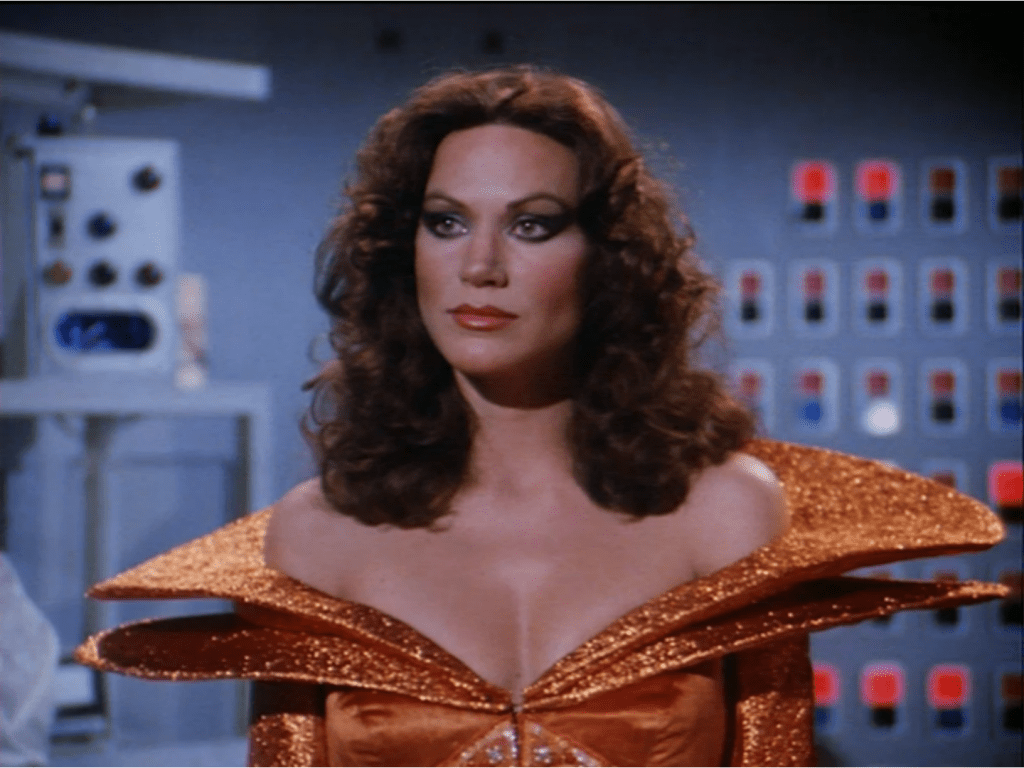
When it comes to iconic villains, Pamela Hensley’s portrayal of Princess Ardala on the 1979-1981 TV series “Buck Rogers in the 25th Century” is often overlooked. However, Princess Ardala is an underrated villain who deserves more recognition for her complexity, cunning, and magnetism. In this blog post, we’ll delve into the character’s most memorable moments and explore why Pamela Hensley’s performance as Princess Ardala deserves a place among the pantheon of unforgettable TV villains.

The Allure of Princess Ardala

One of the essential aspects of Princess Ardala’s character is her undeniable allure. As the seductive and powerful princess from the planet Draconia, Ardala exudes an air of confidence that is both intimidating and mesmerizing. Her elaborate and provocative costumes, combined with her flirtatious demeanor, make her a magnetic presence on-screen. Hensley’s portrayal of the character captures this allure perfectly, making it impossible to look away whenever she graces the screen.

The Complex Nature of Ardala’s Character

While many villains are one-dimensional, Princess Ardala is a multifaceted character with depth and complexity. Her character is driven by a desire for power and a determination to rule the galaxy, but she’s not without vulnerability. As the series progresses, it becomes evident that Ardala is caught between her ambition and her feelings for Buck Rogers.

Pamela Hensley masterfully portrays this inner conflict, allowing the audience to see the humanity beneath the villainous exterior. This depth of character makes Princess Ardala a much more intriguing and relatable villain than many of her counterparts.

Ardala’s Intelligence and Cunning

Princess Ardala’s intelligence and cunning are another aspect of her character that sets her apart as an underrated villain. She is always several steps ahead of her enemies, using her charm and wit to manipulate those around her. Ardala is a brilliant strategist, willing to make ruthless decisions to achieve her goals.

Hensley’s portrayal of the character emphasizes Ardala’s cunning nature, as she expertly navigates the complex world of intergalactic politics and warfare. Her ability to outsmart and outmaneuver her enemies makes her a formidable and compelling antagonist.

Memorable Moments: Ardala’s Confrontations with Buck Rogers

Throughout the series, some of the most memorable moments involve Princess Ardala’s confrontations with the show’s protagonist, Buck Rogers. Their interactions are filled with sexual tension and a battle of wits, as they each try to outsmart the other. These scenes are electric, thanks in large part to the chemistry between Pamela Hensley and Gil Gerard, who played Buck Rogers.

One such scene occurs in the episode “Escape from Wedded Bliss,” where Ardala attempts to force Buck into marrying her as part of a plan to conquer Earth. Their verbal sparring and the high-stakes tension make this episode a standout moment for both characters and showcase Hensley’s ability to command the screen.

Conclusion

Pamela Hensley’s portrayal of Princess Ardala on “Buck Rogers in the 25th Century” is an underrated gem in the world of TV villains. Her magnetic allure, complex character development, intelligence, and memorable confrontations with Buck Rogers make her an unforgettable antagonist. It’s high time we gave Princess Ardala the recognition she deserves as a captivating and multilayered villain who left a lasting impression on the sci-fi television landscape.

This blogpost was created with help from ChatGPT Pro.
Twenty Power BI jokes, courtesy of ChatGPT

Chris’s note: I don’t think joke writers have anything to be concerned about at this point.

  1. Why did the data analyst go broke? They couldn’t stop slicing and dicing their finances with Power BI!
  2. What’s a Power BI analyst’s favorite game? Pivot tabletop games!
  3. What do you call a Power BI dashboard that predicts the future? A clair-visual-ant!
  4. Why did the Power BI analyst refuse to play hide and seek? They always preferred to “Show Data”!
  5. Why was the data analyst always a good dancer? They knew how to pivot in Power BI!
  6. How do Power BI users stay cool in the summer? By using slicers and dicing up some refreshing insights!
  7. Why was the Power BI dashboard so sad? It was missing its Key Performance Indicators!
  8. What do you call a Power BI report with no data? A “blank” canvas!
  9. Why did the Power BI user get a ticket for speeding? They were too busy using the FastTrack!
  10. What do you call a Power BI user who loves making pie charts? A slice-a-holic!
  11. Why did the Power BI dashboard go to therapy? It had too many complex relationships!
  12. How do Power BI users stay in shape? By exercising their data muscles with DAX!
  13. What do you call a Power BI analyst who doesn’t take breaks? A data-driven machine!
  14. Why did the data analyst take a vacation? They needed a break from data modeling and visualization!
  15. What do you call a data analyst who always finds the best insights? A “Power” player!
  16. Why did the Power BI user go to art school? To improve their visual storytelling skills!
  17. What do you call a Power BI report that’s always on time? Punctual-lytic!
  18. What’s a Power BI user’s favorite snack? A delicious data sandwich with extra DAX!
  19. Why did the data analyst throw a party? They finally hit their target KPIs!
  20. What’s a Power BI user’s favorite type of music? Data-driven beats!

This blogpost was created with help from ChatGPT Pro.

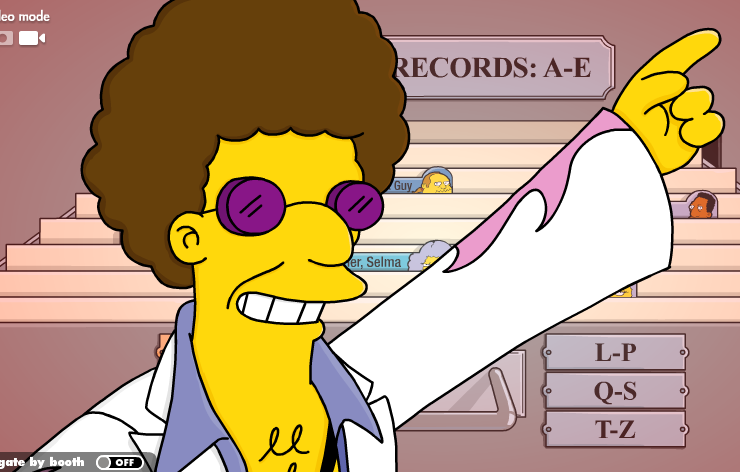
Dancing into Our Hearts: Why Disco Stu is the Best Minor Character on The Simpsons

Introduction

The Simpsons, a long-running, iconic animated sitcom, has given us a plethora of delightful characters since its inception. While we may all know and love the main cast, there’s a whole world of minor characters that have made a lasting impact on the show’s fans. Today, we want to make a case for one of these beloved side characters: Disco Stu. With his groovy dance moves and quirky catchphrases, Disco Stu has won over the hearts of millions, and we’re here to tell you why he truly deserves the title of the best minor character on The Simpsons.

  1. The Nostalgic Appeal

Disco Stu first appeared in the episode “Two Bad Neighbors” in 1997. At the time, disco had long been considered a thing of the past, with most people associating it with the 1970s. But Disco Stu brought it all back, reminding us of a simpler time when people were all about the boogie. In an era where the world was changing rapidly, Disco Stu’s nostalgic appeal offered viewers a sense of comfort and familiarity.

  1. The Unwavering Commitment to Disco

Disco Stu is a character who stays true to his roots. Even as the world around him moves on, he remains unwavering in his commitment to disco. There’s something admirable about his dedication to his passion, no matter how out of step it may seem with the times. Stu’s ability to stay true to himself serves as an inspiration to us all, showing us the importance of embracing our uniqueness and staying true to our passions.

  1. The Iconic Catchphrase

Who could forget Disco Stu’s iconic catchphrase, “Disco Stu doesn’t advertise”? It’s a line that has stuck with fans long after the episode has aired, showcasing Stu’s wit and charm. The catchphrase perfectly captures his personality: cool, confident, and just a little bit quirky.

  1. The Dance Moves

You can’t talk about Disco Stu without mentioning his dance moves. With a style that’s undeniably smooth and groovy, Disco Stu has shown us time and time again that he’s got moves that simply can’t be matched. Watching him dance is a delight, providing viewers with moments of pure joy and entertainment.

  1. The Positive Energy

Disco Stu brings a certain energy to the show that is undeniably infectious. He’s the life of the party, always bringing a smile to people’s faces with his dance moves and witty remarks. In a world that can sometimes feel dark and cynical, Disco Stu offers a refreshing burst of positivity and joy, reminding us of the importance of laughter and light-heartedness.

Conclusion

There’s no denying that The Simpsons has given us a treasure trove of memorable characters, but Disco Stu stands out as the best minor character on the show. With his nostalgic appeal, unwavering commitment to disco, iconic catchphrase, smooth dance moves, and positive energy, Disco Stu has danced his way into our hearts and solidified his place as a fan favorite. So next time you’re watching The Simpsons, take a moment to appreciate the groovy brilliance of Disco Stu, the character who’s always ready to boogie the night away.

This blogpost was created with help from ChatGPT Pro.

Hot Rod: A Comedy Masterpiece for the Ages

In the vast universe of cinematic comedy, there are films that make us chuckle, films that make us laugh, and then there are films that make us howl with laughter, clutching our sides in pure, unadulterated joy. “Hot Rod,” a 2007 comedy directed by Akiva Schaffer and starring Andy Samberg, is one such film. It is a comedy that not only tickles the funny bone but also touches the heart, and it is high time we recognize it as one of the greatest comedies of all time.

“Hot Rod” is a film that thrives on its absurdity, its charm, and its unabashed commitment to its own unique brand of humor. It tells the story of Rod Kimble (Samberg), a self-proclaimed stuntman with a heart of gold, a moped, and a dream. Rod’s mission? To raise money for his stepfather’s heart surgery so he can beat him in a fair fight. If that premise doesn’t scream comedy gold, I don’t know what does.

The genius of “Hot Rod” lies in its ability to take this ridiculous premise and run with it, never once looking back or second-guessing itself. It’s a film that knows exactly what it is and revels in it. It’s a comedy that isn’t afraid to be silly, to be weird, to be over-the-top. And it’s all the better for it.

The performances in “Hot Rod” are nothing short of brilliant. Samberg’s Rod is a lovable underdog, a character whose earnestness and determination are as endearing as his stunts are hilariously disastrous. The supporting cast, including Bill Hader, Danny McBride, and Isla Fisher, are equally fantastic, each bringing their own unique brand of humor to the table and adding to the film’s overall comedic brilliance.

But “Hot Rod” isn’t just a series of gags and stunts. It’s a film with heart. Amidst all the hilarity, there’s a genuine emotional core to the story. Rod’s quest isn’t just about beating his stepfather; it’s about proving himself, about achieving his dreams, about finding his place in the world. It’s a story that, despite its absurdity, resonates on a deeply human level.

The film’s comedic style is also worth noting. “Hot Rod” is a masterclass in comedic timing, physical comedy, and visual gags. It’s a film that understands the power of a well-placed joke, a perfectly timed reaction, a hilariously awkward silence. It’s a film that knows comedy isn’t just about what’s said, but also about what’s shown, what’s implied, what’s left unsaid.

Moreover, “Hot Rod” is a film that isn’t afraid to take risks. It’s a film that dares to be different, that dares to defy convention, that dares to be unabashedly itself. And in a world where so many comedies feel formulaic and predictable, that’s a breath of fresh air.

In conclusion, “Hot Rod” is a comedy masterpiece. It’s a film that delivers laughs, heart, and a healthy dose of absurdity in equal measure. It’s a film that reminds us of the power of comedy, of the joy of laughter, of the beauty of a well-told joke. It’s a film that deserves to be recognized as one of the greatest comedies of all time. So, if you haven’t seen it yet, do yourself a favor and dive into the hilarious, heartwarming world of Rod Kimble. You won’t regret it.

This blogpost was created with help from ChatGPT Pro.

Enhancing Your Power BI Reports with Sound Effects: A Step-by-Step Guide

Chris’s note: You’ll need to use one of the HTMLViewer custom visuals that requires an additional cost from what I can discern to have this work successfully.

Introduction

Visual representations are an essential aspect of data analysis, but why not take it a step further and add sound effects to your Power BI reports? Sounds can enhance the user experience and make your reports even more engaging. In this blog post, we will walk you through a step-by-step guide on how to add sound effects to your Power BI reports.

Prerequisites

Before we dive in, make sure you have the following:

  1. A Power BI Pro or Premium account
  2. Power BI Desktop installed on your computer
  3. Audio files in MP3, WAV, or OGG format that you want to use as sound effects
  4. Familiarity with creating basic Power BI reports

Adding Sound Effects to a Power BI Report: Step-by-Step Guide

Step 1: Create a new table for audio files

First, we need to create a new table that will hold the audio file names and their corresponding URLs. In the Power BI Desktop, go to the ‘Home’ tab, click on ‘Enter Data,’ and create a new table with two columns: ‘AudioName’ and ‘AudioURL’. In the ‘AudioName’ column, provide descriptive names for your audio files, and in the ‘AudioURL’ column, insert the web URL where your audio files are hosted. This is necessary because Power BI does not support local audio files.

Step 2: Create a custom column with a JSON definition

We will now create a custom column in the audio table that contains a JSON definition for the audio files. This JSON definition will be used later to trigger the audio playback using a custom visual.

  1. Click on the audio table you created earlier.
  2. In the ‘Modeling’ tab, click on ‘New Column.’
  3. In the formula bar, enter the following formula:
AudioJSON = "{\"url\":\"" & [AudioURL] & "\",\"name\":\"" & [AudioName] & "\"}"

This formula creates a JSON definition for each audio file in your table, which includes the file’s URL and name.

Step 3: Install the HTML Viewer custom visual

To play the audio files, we need to add the HTML Viewer custom visual to our report.

  1. In the Power BI Desktop, go to the ‘Home’ tab and click on ‘Import from AppSource.’
  2. Search for ‘HTML Viewer’ and install the custom visual by clicking on ‘Add.’

Step 4: Add the HTML Viewer custom visual to your report

Now that the HTML Viewer custom visual is installed, we will add it to our report.

  1. In the ‘Visualizations’ pane, click on the ‘HTML Viewer’ icon.
  2. Drag and drop the ‘AudioJSON’ column from your audio table to the ‘HTML Content’ field in the ‘Fields’ pane of the HTML Viewer.

Step 5: Create an audio player using HTML and JavaScript

The HTML Viewer custom visual allows us to display custom HTML content, so we will use it to create an audio player.

  1. Click on the ‘HTML Viewer’ visual that you added to your report.
  2. In the ‘Visualizations’ pane, go to the ‘Format’ tab.
  3. Click on ‘Edit’ next to ‘HTML Content.’
  4. Enter the following HTML and JavaScript code in the ‘HTML Content’ field:
<!DOCTYPE html>
<html>
<head>
<style>
audio {
  display: none;
}
</style>
<script>
function playAudio(url) {
  var audio = new Audio(url);
  audio.play();
}
</script>
</head>
<body>
<audio id="audioPlayer"></audio>
<script>
var audioData = JSON.parse('{{AudioJSON}}');
var audioPlayer = document.getElementById('audioPlayer');
audioPlayer.src = audioData.url;
playAudio(audioData.url);
</script>
</body>
</html>

This code creates a hidden audio player and plays the audio file based on the JSON definition provided in the ‘AudioJSON’ column.

Step 6: Add a slicer to select sound effects

To enable users to choose the sound effect they want to play, add a slicer visual to your report.

  1. In the ‘Visualizations’ pane, click on the ‘Slicer’ icon.
  2. Drag and drop the ‘AudioName’ column from your audio table to the ‘Field’ area in the ‘Fields’ pane of the slicer.

Now, when users click on a sound effect in the slicer, the corresponding audio file will play using the HTML Viewer custom visual.

Conclusion

In this blog post, we showed you how to add sound effects to your Power BI reports using a combination of custom visuals and HTML/JavaScript. While this method is not supported natively by Power BI, it provides an engaging and interactive way to enhance your reports. With a little creativity, you can take your Power BI reports to the next level and create a truly immersive experience for your users.

This blogpost was created with help from ChatGPT Pro.